Image Resizer
Краткое описание
The Image Resizer module is designed for convenient resizing of images after they are uploaded to the site. It is especially useful in situations where the same image is used in different parts of the site, but needs to be displayed in different sizes.
Полное описание
The Image Resizer module is designed for convenient resizing of images after they are uploaded to the site. It is especially useful in situations where the same image is used in different parts of the site but needs to be displayed in different sizes.
For example, according to the site design, the same image may be displayed in several blocks: in the teaser, in the list of materials, and in the full version of the article. If you simply reduce the image using HTML or CSS, the image actually remains large (for example, 500×400 px), while occupying a smaller area (300×250 px). This negatively affects SEO, as it increases page weight and reduces loading speed — parameters that search engines take into account when ranking.
Main features of the module
Image Resizer is useful not only from an SEO perspective, but also greatly simplifies the work of developers and site administrators. In news and content projects, it is often necessary to display one image in different proportions and sizes. With standard scaling via CSS, the aspect ratio may be distorted, which worsens the appearance.
Thanks to the Crop feature, the module automatically cuts out the required area of the image and resizes it to the specified dimensions without losing proportions. You can specify which part of the image should be used — center, top, bottom, or corners.
Working with external images
As an additional feature, the module supports working with external images. If a material uses an image uploaded to a third-party service (via a direct link), Image Resizer can automatically download it to your server and then perform:
-
resizing;
-
quality adjustment;
-
image cropping.
SEO optimization of file names
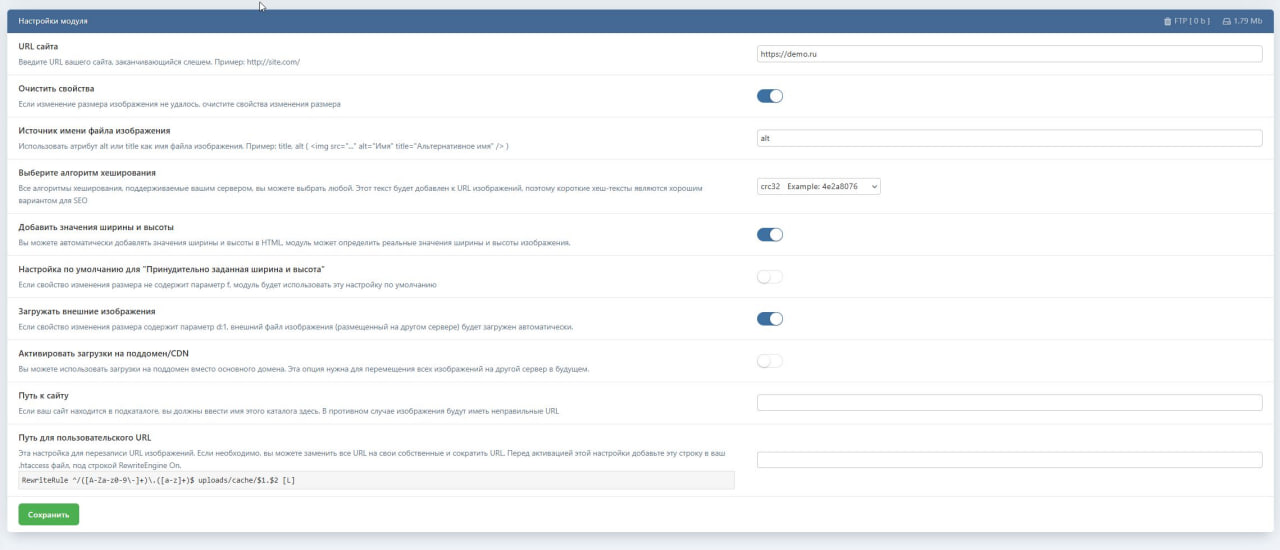
One of the problems with DLE is the addition of a Unix timestamp to the image name. Such long and unreadable file names are not useful for SEO. Image Resizer solves this problem by allowing you to use the alt tag value as the file name.
Thus, images can automatically receive meaningful, SEO-friendly names without unnecessary prefixes.
Performance and caching
Image resizing is not performed every time the page is opened. Processing occurs only when the image is displayed for the first time, after which the result is saved in the cache. This means that:
-
server load is minimal;
-
page loading speed does not decrease;
-
reprocessing is not required.
Short URLs for images
If even after renaming the image URL remains too long, you can replace the path/uploads/cache/
with a virtual directory, for example /resimler/.
⚠️ Important: the specified virtual path must not match the system directories actually in use or category names.
Automatic addition of width and height
After resizing an image, the module can automatically add the width and height attributes to the HTML code. This has a positive effect on SEO and layout stability, since the browser knows the image dimensions in advance.
Usage example
TPL code:
HTML without the module
Image size: standard medium from the admin panel
HTML with module
Size: 140×100 px, quality: 90%
HTML with module (without automatic naming):
Image upload via external link
You can automatically download images from third-party sites using the d:1 parameter:
Result:
The image size was reduced from 94 KB to 12 KB, which significantly reduces the overall page weight.
Flexibility of use
The module can be used in any .tpl file. It is compatible with:
-
image tags;
-
additional fields;
-
standard DLE templates.
If necessary, the module can be enabled and disabled at any time.
Loading speed optimization
If you are not satisfied with your site loading speed and use images of different sizes, Image Resizer will clearly show the difference in Google PageSpeed.
For even greater optimization, you can:
-
download images from
/uploads/cache/; -
compress them further using utilities (for example, optipng);
-
upload them back to the server.
Parameter entry formats
Crop
Before cropping, the image is automatically reduced to the minimum allowed size, after which cropping is performed.
Parameter description
-
w — width
-
h — height
-
q — quality (0–100)
-
f — adding width and height to HTML
-
d — uploading an external image to the server
-
e — scaling orientation:
-
1orw— by width -
2orh— by height -
0or empty — by the longer side
-
Additional features
In the admin panel, you can choose a hash method supported by the server. It is used to generate a unique suffix for the file name, for example:
This is a fork of the module, the code has been fixed to work on current versions of DLE 19.0 (The original is here: https://github.com/dlenettr/image-resizer).
If you copy this file to your site, please include a link to our site as the authors of the modification!
Скриншоты
Комментарии (0)
Пока нет комментариев. Будьте первым!
Чтобы оставить комментарий, войдите через Telegram